Members and payments
Take new member applications online
Switch on your club's join page, add payment details, and share the link or QR code.
Step 1: Turn on your join page
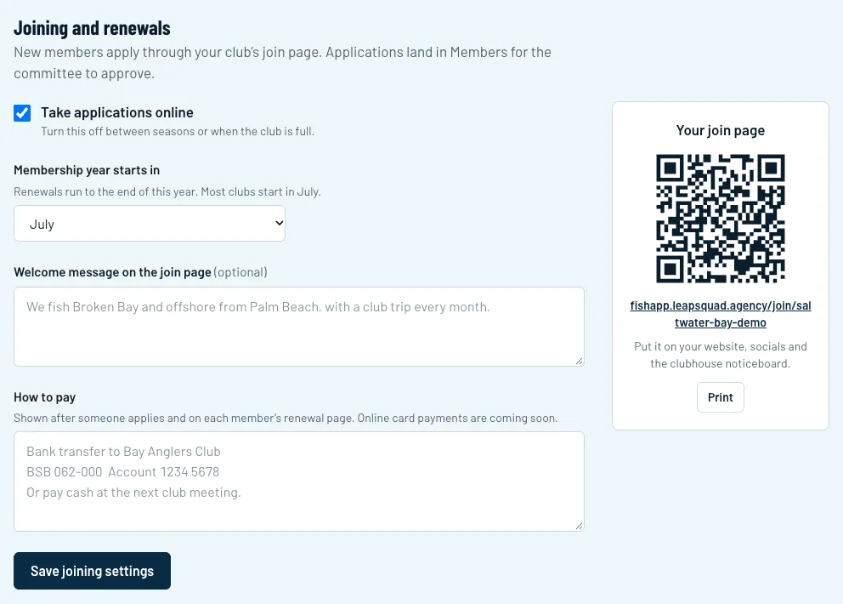
Go to Club settings and scroll to Joining and renewals. Tick Take applications online (1) and choose the month your membership year starts (2). Most clubs start in July.
Swipe sideways to see the whole screen.Full size Step 2: Tell people how to pay
Under How to pay (1), add your bank details and any other ways to pay, like cash at the next meeting. New members see this after they apply, and members see it when they renew. Click Save joining settings (2).
Swipe sideways to see the whole screen.Full size Step 3: Share the link
Your join page link and QR code are on the right (1). Put the link on your website and socials, and click Print for a sheet to pin up in the clubhouse.
Swipe sideways to see the whole screen.Full size Step 4: What new members see
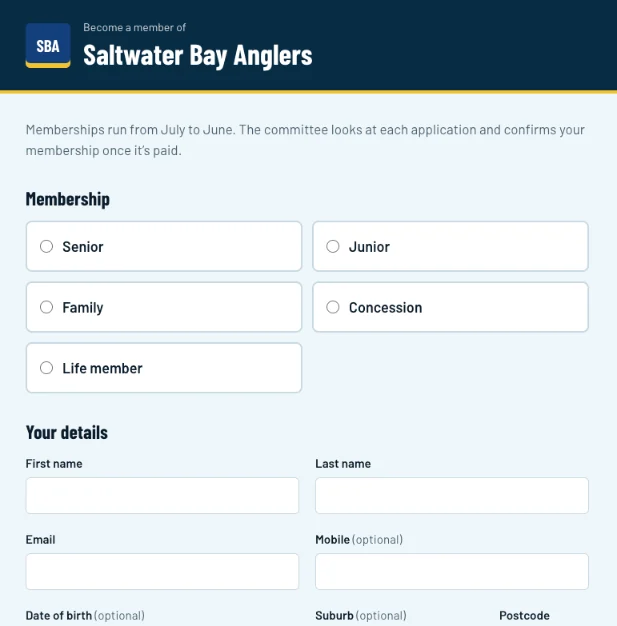
They pick a membership (1), fill in their details and send the application. It lands in Members for the committee to approve, and the member is active once their payment is recorded.
Swipe sideways to see the whole screen.Full size